Feedback UI
Fedo ships two UI entry points on each platform:
| Android (Compose) | iOS (SwiftUI) | |
|---|---|---|
| Full feedback board (list, details, editor) | FedoFeedbackScreen() | FedoFeedbackView() |
| Submission-only sheet | FedoCreateFeedbackSheet() | .presentFedoCreateFeedback(isPresented:) |
Signature
- Kotlin
- Swift
@Composable
fun FedoFeedbackScreen(
    modifier: Modifier = Modifier,
    onDismiss: () -> Unit,
)
| Parameter | Type | Description |
|---|---|---|
modifier | Modifier | Compose modifier for sizing/padding |
onDismiss | () -> Unit | Called when user navigates back from the root screen |
struct FedoFeedbackView: View {
    init()
}
No parameters: the view reads everything it needs from the SDK singleton.
It pushes its screens onto the enclosing NavigationStack, so present it
with a NavigationLink:
NavigationLink("Feedbacks List") {
    FedoFeedbackView()
}
NavigationView is not supported: rows open, but the "+" and Edit
actions do nothing under it.
To show it modally, give it its own NavigationStack. Don't use
fullScreenCover: the view has no close button, so the user can't
dismiss it.
.sheet(isPresented: $showFeedbacks) {
    NavigationStack {
        FedoFeedbackView()
    }
}
There is no onDismiss: back navigation is the system's. If the SDK was
never initialized, the view shows a "Feedback isn't available right now"
placeholder instead of the list.
Screens
The board manages its own internal navigation with three screens (identical on both platforms):
1. Feedback List
- Shows feedback items in a vertical list with pull-to-refresh
- Status filter: All, In review, Planned, In progress, Shipped, Closed (tabs on Android; a toolbar menu with a count per status on iOS)
- FAB to create new feedback
- Vote buttons on each item
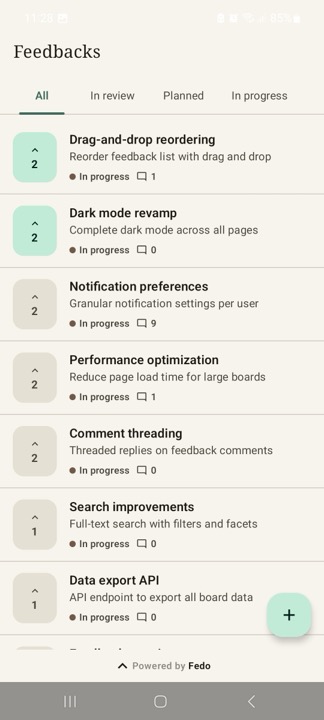
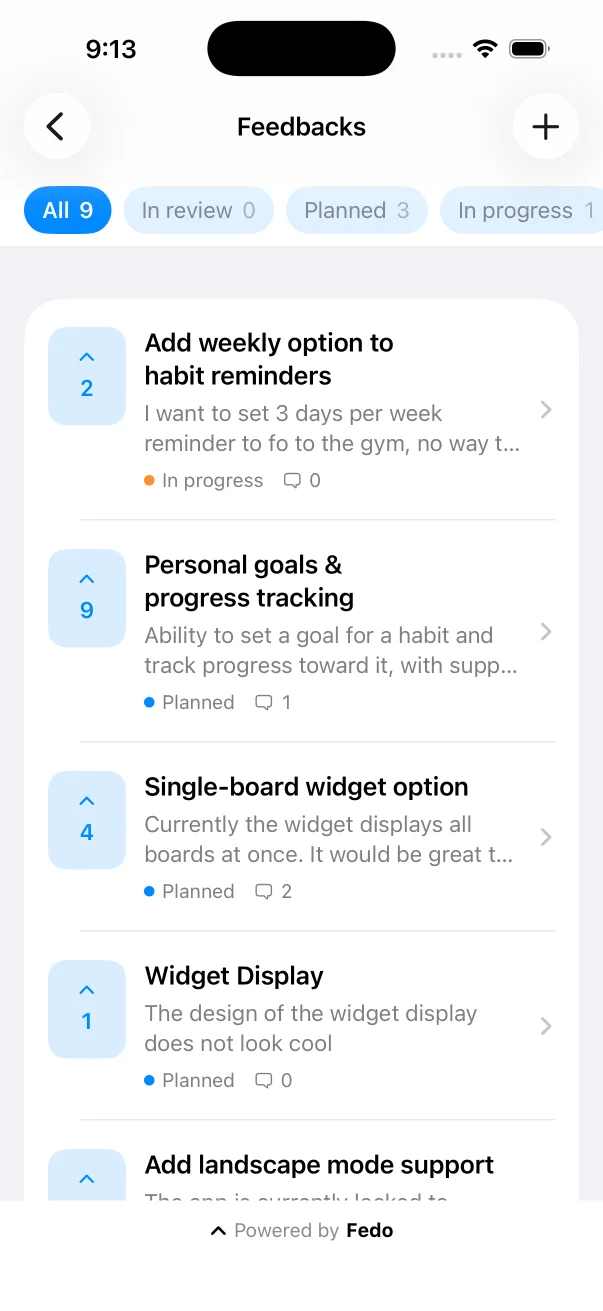
The board follows each platform's own conventions, so Android and iOS look different by design.
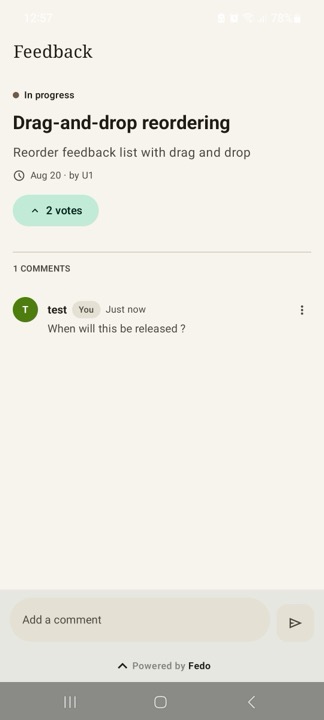
2. Feedback Details
- Full feedback description
- Vote on the feedback
- Edit/delete own feedback (when status allows)
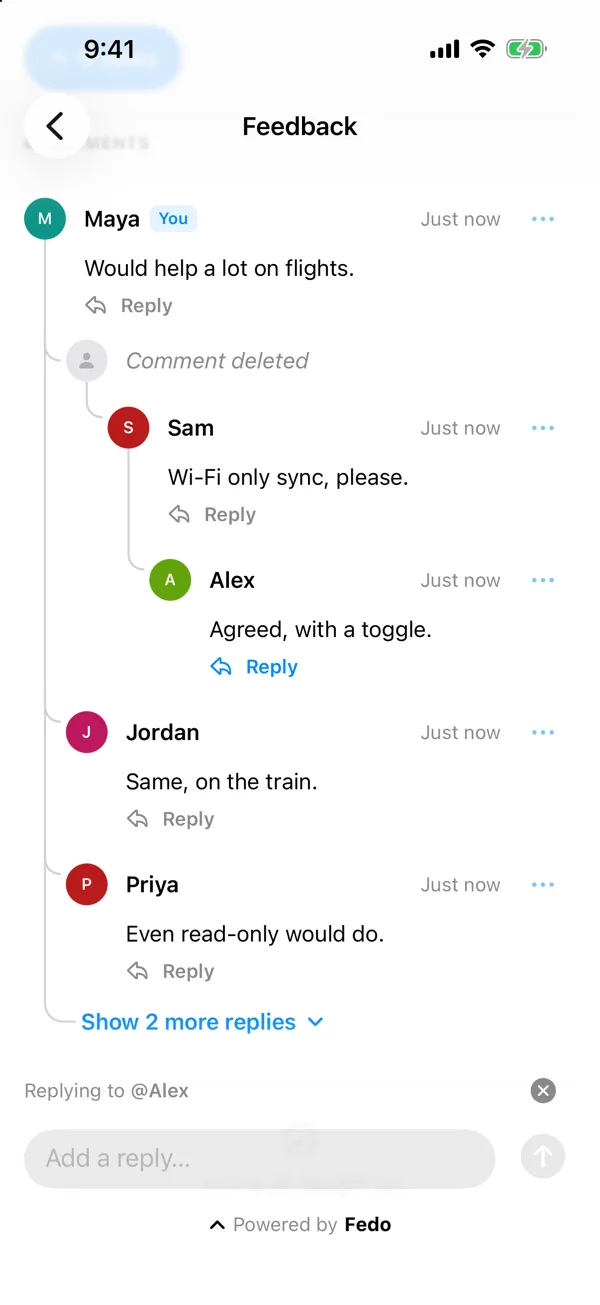
- Comments and threaded replies (see Comments and replies)
Comments and replies
Replies are part of FedoFeedbackScreen() and FedoFeedbackView() and add no
API, so there is nothing to set up. Both platforms behave the same unless
noted.
-
Replying. Each comment has a Reply button. Tapping it focuses the comment field and shows a "Replying to @name" strip above it. The strip's close button cancels the reply and keeps what the user typed.
-
Nesting. Users can reply to replies, with no practical depth limit. Indentation stops at three levels; deeper replies show "↳ Replying to @name" instead.
-
Order. Top-level comments are newest first. Replies inside a thread are oldest first, so a thread reads like a conversation.
-
Loading. Top-level comments load in pages as the user scrolls, and the list ends with "You're all caught up". Each thread shows its first replies inline and the rest behind a "Show n more replies" row. If a load fails, a Retry row takes its place.
-
Deleting. A deleted comment that has replies becomes a "Comment deleted" placeholder, and its replies stay. A deleted comment without replies is removed. The delete confirmation says which of the two will happen. Replies are comments: users edit and delete their own replies the same way as their own comments.
-
Count. The comment count includes replies and deleted placeholders.
-
Errors. When a reply can't be posted, the user sees one of these messages (a snackbar on Android, a toast on iOS):
- "This comment was deleted." The comment being replied to was deleted in the meantime.
- "This thread can't take more replies." The thread is nested too deep.
- "Replies aren't available on this board." The board's plan no longer includes replies.
The draft is kept and the "Replying to" strip closes, so sending again posts it as a top-level comment. For the first and last, the comments reload.
Plans
Replying is a Plus and Pro feature (pricing). Your plan decides it; you can't turn it on or off yourself. On Starter there is no Reply button and no "Replying to" strip. Replies that already exist stay visible but can't be replied to. Top-level comments, editing and deleting work as usual. The SDK reads this from the server, so a plan change applies without an app update.
Older app versions
Users on an SDK before 0.5.0 (0.4.x and older) share the same board but can't
reply. They see replies as flat comments starting with
reply to @name "…", or with reply to a deleted comment when the comment
being replied to was deleted. Replies a user wrote themselves (from a newer app
version) show without this prefix. Older versions don't show deleted
placeholders, so their comment count can be higher than the number of comments
they see.
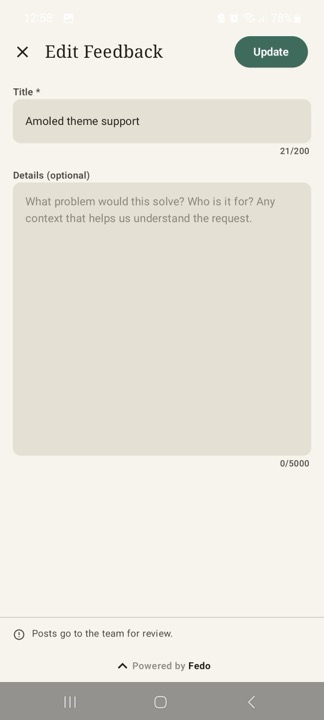
3. Feedback Editor
- Create new feedback (title + description)
- Edit existing feedback (pre-populated fields)
- Validation before submit
- Asks before discarding unsaved changes
Navigation
Back navigation is automatic. On Android:
- Editor → Details / List
- Details → List
- List →
onDismissfires
The onDismiss lambda is only called when the user presses back on the root list screen. Your app handles this by popping its own navigation stack.
On iOS there is no onDismiss: FedoFeedbackView pushes onto your
NavigationStack, so the system back button pops it for you.
State handling
The screen handles loading, error, and empty states internally. No extra UI work needed.
In the comments, a page or a set of replies that fails to load leaves a Retry row in its place. A reply that fails to post keeps the user's draft (see Comments and replies).
If the SDK has not been initialized, FedoFeedbackScreen() renders a full-screen "Fedo not initialized" placeholder in place of the board. On iOS, FedoFeedbackView() shows a "Feedback isn't available right now" placeholder and logs an error to OSLog. Neither crashes.
Feedback Sheet
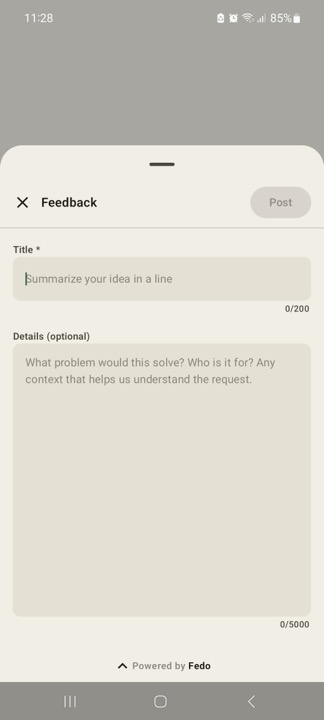
The submission sheet is built per platform. On Android, FedoCreateFeedbackSheet() renders a self-contained creation form (title + details fields) as a ModalBottomSheet, with its own submit state and validation - no navigation setup or FedoFeedbackScreen() host required. On iOS, the equivalent is the .presentFedoCreateFeedback(isPresented:) view modifier, which presents the same sheet without requiring a NavigationStack or FedoFeedbackView host. Use it when you want a lightweight "suggest a feature" entry point (e.g. from a menu or FAB) instead of the full feedback flow.
Signature
- Kotlin
- Swift
@Composable
fun FedoCreateFeedbackSheet(
    onDismiss: () -> Unit,
    modifier: Modifier = Modifier,
)
| Parameter | Type | Description |
|---|---|---|
onDismiss | () -> Unit | Called when the sheet is dismissed by the user (swipe/scrim/close button) or automatically after a successful submit |
modifier | Modifier | Compose modifier applied to the ModalBottomSheet container |
There's no visible param - toggle composition yourself:
@Composable
fun MyScreen() {
    var showFeedbackSheet by remember { mutableStateOf(false) }

    Button(onClick = { showFeedbackSheet = true }) {
        Text("Suggest a feature")
    }

    if (showFeedbackSheet) {
        FedoCreateFeedbackSheet(
            onDismiss = { showFeedbackSheet = false }
        )
    }
}
On success, the form is replaced with a brief thank-you message before the sheet auto-dismisses, which fires onDismiss.
extension View {
    func presentFedoCreateFeedback(isPresented: Binding<Bool>) -> some View
}
| Parameter | Type | Description |
|---|---|---|
isPresented | Binding<Bool> | Drives presentation, exactly like SwiftUI's sheet(isPresented:content:). Set back to false on swipe-down, close button, or auto-dismiss after a successful submit |
struct SettingsView: View {
    @State private var showFeedbackSheet = false

    var body: some View {
        Button("Suggest a feature") {
            showFeedbackSheet = true
        }
        .presentFedoCreateFeedback(isPresented: $showFeedbackSheet)
    }
}
No NavigationStack or FedoFeedbackView host required.
If Fedo.initialize has not been called, FedoCreateFeedbackSheet() shows the same "Fedo not initialized" error inside the sheet, while FedoFeedbackScreen() shows it full-screen. On iOS, the sheet shows the same "Feedback isn't available right now" placeholder as FedoFeedbackView(). On both platforms, calls to user-management methods (setUserID, setUserEmail, etc.) are silent no-ops — they do not throw.